News
What's new in Rareytec Thermo, newest first. Each post opens with what it means for you; open The details for the full story.
The site is now called Rareytec Thermo
The property data bank, estimation, regression and simulator import/export site is now named Rareytec Thermo. The word "Platform" is gone from the pages, messages and the assistant. Nothing else changes: your projects, files, links and logins stay as they are. The CHEMCAD and Aspen bridges keep working without any change. The macro names in existing CHEMCAD simulations (PlatformServe, PlatformLink) and the bridge settings key stay the same, so you do not need to re-paste anything. Applications built on top of this data and these models, such as entrainer selection and cocrystal or crystallization studies, will move to a separate site, Rareytec Thermo Expert, which uses Rareytec Thermo through its interface.
Core γ∞ and azeotrope data now reach the binary figures and fits
ThermoML names the component every composition and activity coefficient refers to: the solute of an infinite-dilution activity coefficient, the component of a vapour mole fraction or of an azeotropic composition. Until now the platform kept that reference for the measured variables only. Without it, γ∞ values and azeotropes could not be oriented, so the binary pages left almost all of them out. The reference is now stored for every property and constraint, and the existing core data sets were updated in place. Binary pages now show about 9,350 core γ∞ data sets (42,000 values) instead of 630, and 106 core azeotrope sets instead of 18. A few vapour and gas-solubility compositions that had been read for the wrong component are now oriented correctly. All data-set ids and your exclusions are unchanged. Some older core sets still hold two ThermoML columns of the same name in one channel. They are left as they are until a re-ingest of the core.
Imported DDB and IK-CAPE data now reach every figure and fit, once
Data you import from IK-CAPE files, from DDB IK-CAPE exports and from DDB electrolyte exports is now read from one place only: the project's experimental store. Before this, some pages showed only core data and left the imported sets out. Others read each imported set twice, once from the store and once from the import list, so the binary fit counted those VLE sets double. A second IK-CAPE import could also remove the first file's sets from the store. Now every figure and fit reads each set exactly once. γ∞ tables are stored in the same form as the core data. Azeotrope tables, from the core and from imports, enter the binary fit. Importing the same file again keeps the unchanged sets and their ids, so sets you excluded stay excluded. A set that another file already brought in is not stored a second time. Imported binary sets now have new keys in the fit's set list. If you excluded imported sets in a binary fit before today, check those exclusions once.
ThermoML ratios and differences are no longer read as absolute values
ThermoML can report a property relative to a reference state instead of as an absolute value: a viscosity as a ratio to pure water, a density as an increment over the solvent, an entropy as a difference to a reference temperature. Until now the platform stored these numbers as if they were absolute. The reference value is not part of the record, so they cannot be converted back. Every such value is now marked with ThermoML's own wording and withheld from plots, fits and exports. In the core that affects about 1,900 data sets, among them 57 viscosity-ratio and 220 density-difference sets. Data-set lists show them as withheld, with the reason. Nothing was deleted, and all data-set ids and exclusions are unchanged. Enthalpies of solution reported as a difference to the pure solute stay readable, since that difference is the property itself. If you fitted a model to data that included withheld sets, refit it.
Electrolyte density — the Debye-Hückel volume model
A second density model is now available for aqueous electrolytes: Debye-Hückel volume, as in Aspen Plus (VAQDH). You choose it once per project in the Property models row. The salt's apparent molar volume is V∞ plus a Debye-Hückel term, whose slope comes from water's density, compressibility and permittivity at each point's temperature and pressure (273–623 K). Only V∞ is fitted: one linear fit over every water page of the project with that salt. Aspen keeps V∞ constant; an optional V∞(T) tick box adds a temperature slope of our own. Jones-Dole viscosity, Riedel thermal conductivity and Onsager-Samaras surface tension now read their molarity from whichever density model the project uses. A stored fit made on the other density model is flagged stale until you refit it.
Electrolyte surface tension — the Onsager-Samaras model
The surface-tension page of a salt–solvent pair now runs a model: Onsager-Samaras, as in Aspen Plus (SIG2ONSG) and CHEMCAD. It is predictive, so there is nothing to fit. The salt changes the solvent's surface tension by Δσ = (80/ε)·c·log10[1.13·10⁻¹³(εT)³/c] mN/m, weighted by the salt mole fraction as in Aspen's documented equation. The model needs three things: the solvent's surface tension from its component page (IAPWS 1994 for water unless you choose a correlation there), the solvent's relative permittivity (built for water), and the molarity from the salt's Clarke volume. Fit the density first. Onsager-Samaras is a limiting law for dilute solutions. For water at 25 °C its correction peaks near 0.5 mol/L and turns negative above about 1.4 mol/L. At higher concentrations, expect measured surface tensions to lie above the model; the page shows the deviation by data set.
Electrolyte thermal conductivity — the Riedel model
The thermal-conductivity page of a salt–solvent pair now runs a model: Riedel, as in Aspen Plus (KL2RDL) and CHEMCAD (Riedel/Jamieson). The salt shifts the solvent's conductivity in proportion to its molarity, λ = [λ_solvent(293 K) + a·c]·λ_solvent(T)/λ_solvent(293 K), and the result follows the solvent's own temperature and pressure dependence. Aspen builds a from one coefficient per ion (IONRDL). One salt's data only fix the sum, so the platform fits a = a_cation + a_anion per salt, in one least-squares fit over every salt–solvent page of the project that contains that salt. The value is stored for the project in W/(m·K)·L/mol, which is numerically the same as Aspen's W/(m·K)·m³/kmol. The molarity comes from the salt's Clarke volume, so fit the density first. If the Clarke parameters change later, the Riedel fit is marked stale. The solvent's thermal conductivity comes from its component page. For water, unless you choose a correlation there, it is the IAPWS 2011 formulation including the critical enhancement. The enhancement is negligible below about 450 K and adds about 1 % on the saturated liquid at 573 K. As on every property page, a point that gets no model value is counted and the reason is given.
Electrolyte mixtures get their property pages — density, viscosity and diffusion models, chosen once per project
Click a salt–solvent pair in an electrolyte project and you now land on a hub for that pair: its parameter card, model-only activity-coefficient estimates, and a table of every kind of measured data the banks hold for it. Each mixture property — density, viscosity, electric conductivity, refractive index, surface tension, speed of sound and the diffusion coefficient — has its own page with its data sets, and where a model is built, the model runs through the data point by point with its deviation statistics. The activity data stay on the γ-φ model-fit page, which now shows only what that model describes. The model for each property is chosen once for the whole project, in the new "Property models" row of the project page. That is how Aspen Plus and CHEMCAD work too: both choose these models globally, so every pair of a mixture has to use the same one. The list holds the models the two simulators offer. Three are built today; the others are listed as planned and cannot be selected yet. Density — Clarke (Aspen VAQCLK, CHEMCAD's Clark correction). The salt's infinite-dilution volume V∞ and its concentration coefficient A are fitted in one least-squares fit over every salt–solvent page of the project that contains that salt. Measured densities and apparent molar volumes both count. The temperature and pressure dependence follows the solvent's own density from its component page: IAPWS-IF97 for water unless you choose a correlation there. Viscosity — Jones-Dole (Aspen MUL2JONS). η = η_solvent·(1 + A√c + B·c), with the molarity c from the Clarke volume and B = B1 + B2·T fitted. The A coefficient can be fitted, fixed at a value you enter, or calculated from the Falkenhagen limiting law. In that case A follows temperature through the solvent's viscosity and permittivity and the ions' limiting conductivities. Water viscosity is IAPWS 2008. A fit remembers the inputs it was made with and is marked stale when one of them changes later. Ion mobilities (IONMOB). The limiting molar conductivity of each ion, λ∞ = l1 + l2·T, is entered once per project at 25 °C together with its temperature slope and a required source note. The page shows it in S·cm²/mol next to Aspen's IONMOB/1, /2. One set of ion values drives both the Falkenhagen A of Jones-Dole and the diffusion model below, and both pages show the same values. The platform ships no ion table of its own; the values are yours, with your reference. Diffusion — Nernst-Hartley (Aspen DL0NST/DL1NST, CHEMCAD). This model is purely predictive: nothing is fitted. Each ion's diffusivity follows from its limiting conductivity, D_i = R·T·λ_i/(z_i²F²), with Aspen's factor for the true mole fraction of the solvent. Measured data are the salt's mutual diffusion coefficient, so the page compares them with the Nernst-Haskell combination of the two ion diffusivities. That combination is exact at infinite dilution. At finite concentration the deviation you see is the thermodynamic factor and ionic-relaxation effect that the model leaves out — a known property of the model, not a fitting error. As everywhere on the platform, a point that gets no model value is counted and the reason is given; nothing is dropped silently. The right-click and per-set exclusions work on every property page. Thermal conductivity (Riedel), surface tension (Onsager-Samaras) and the other viscosity forms (Breslau-Miller, Carbonell and CHEMCAD's log-mole / log-mass forms) are next in line.
One set of values, used everywhere — the component page is now the single authority
What you see on a component's page is now exactly what the whole platform uses. Until this release a few places computed their own pure-component values: a component page could show a GRAPPA vapour pressure while the CHEMCAD neutral-file export or a binary VLE page quietly used the Rarey-Nannoolal one, which for some components differs by a factor of three. That second set of numbers is gone. The property and correlation pages, the vapour pressure behind the binary pages and their regression, the electrolyte workbook, the experimental-data plots, the gas-solubility classification, the Claude assistant and every export (.nf, .ccsim, Aspen Plus) now read one and the same value — the one on the page. Where that value comes from is still your choice per component, with the Parameters pulldown on the project page. "This project", the default for every new component, is filled with the rulebook defaults: the estimate the platform currently judges best for that component — IAPWS for water, GRAPPA where it is the preferred method, Rarey-Nannoolal otherwise. As further methods and test results come in, the rulebook will pick the best method per component, so two components in one project may well carry different default methods; that is by design. Anything you choose or regress overrides the default. Pick a library project instead and its values become the authority, write-protected. Pick the CHEMCAD databank and CHEMCAD's own record is used for every calculation — but, as before, its numbers are never displayed or written to a file. The .nf and Aspen exports now stop with a clear message for such a component rather than filling in values of their own; switch it to "This project" or a library to export it. Two consequences you may notice. Exports now carry the complete page set — your choices, core-bank values and the rulebook defaults, including the default vapour-pressure curve — each with its source written alongside. And the vapour-pressure shift factors of the VLE regression (one overall, one per data set, which separate pure-component from mixture effects such as sample purity and T/P calibration) stay strictly inside the regression: they never alter the page's vapour pressure and are never folded into the binary interaction parameters.
Take a whole CHEMCAD project home — three ways to move a project between CHEMCAD and the platform
Until now the link between your own CHEMCAD and a project here carried only computed numbers: you could run a VLE, heat-of-mixing or flash calculation in your licensed CHEMCAD and pull the resulting curves into a binary page, but the project itself stayed put — the platform's copy on the platform, your .ccsim on your PC. This release lets the whole project travel. Its components, the parameters you chose, the binary sets you fitted and the library links you made can move up from your PC into a platform project, or back down into a running CHEMCAD, through the same small bridge that already runs the calculations — and, as always, only when you click. There are two ways you drive the platform together with CHEMCAD, and the project page offers the moves that fit whichever one you are in. When you start from the platform and tick "Use my own CHEMCAD" on a project, the platform is in client mode: your .ccsim lives on your PC and the bridge opens it there. When you instead launch the platform from inside CHEMCAD — running the supplied macro against a simulation you already have open — the platform is in live-link mode: the bridge attaches to that running flowsheet and never opens or closes a file of its own. In both cases the calculations run on your machine with your licence; the platform server never connects to your computer. A small lifecycle bar now appears at the top of a CHEMCAD project whenever one of those two modes is in play, with up to three actions. "Return project to CHEMCAD" (offered when you arrived from the CHEMCAD macro) packs the project into its portable container and drops it straight into your open CHEMCAD's working folder, so it rides home inside your .ccsim the next time you Save — the platform keeps nothing. "Save simulation to platform" does the opposite: after you Save in your own CHEMCAD, it stores a copy of that .ccsim here so the project's last-saved state is preserved on the platform. "Load onto this PC" fetches that stored copy back onto your machine and hands its path to the bridge so CHEMCAD can open it. The dashboard project list has gained a "Saved" column showing the name and time of the copy the platform is currently holding, so you can see at a glance which projects have a simulation parked here and how fresh it is. Nothing about this weakens the rule the bridge was built on. The helper listens on your own computer only (127.0.0.1), answers only to this site, and writes the project file straight into CHEMCAD's own working folder; your simulation is never uploaded unless you press "Save simulation to platform" yourself. The idea is that a project can live wherever you are working on it and be handed cleanly to the other side, rather than being copied by hand and drifting into two versions.
HANNA — a neural-network activity-coefficient model, alongside UNIFAC and COSMO-SAC
A third kind of predictive mixture model now sits beside the UNIFAC family and COSMO-SAC in the predicted-model pulldown on the binary, mixture and ternary pages: HANNA, a hard-constraint neural network for activity coefficients from the group of Fabian Jirasek and Hans Hasse at RPTU Kaiserslautern (published in Chemical Science). Where UNIFAC needs a group assignment and COSMO-SAC needs a stored σ-profile, HANNA reads each component's molecular structure directly and returns the activity coefficients from that alone — a genuinely different route to a prediction for a system nobody has regressed yet. Like GRAPPA for boiling points, HANNA runs on our own lab server, so no structure of yours is ever sent outside, and the published model is used unchanged. It is offered for neutral, single-fragment molecules; it is not offered for salts or multi-fragment structures, and the option is greyed out with the reason when the lab endpoint is not reachable. On the mixture page you get the full estimation overlay — bubble curves, the liquid-liquid gap, excess enthalpy and the infinite-dilution coefficients — and on the ternary page HANNA draws the complete liquid-liquid diagram, tie lines and plait points included. Every HANNA value is an evaluation of the network model rather than a quick group sum, so the platform is careful about how often it asks: it evaluates HANNA once on a composition grid per temperature — a fine grid along the binary line, a triangular grid over the whole composition triangle on the ternary page — and interpolates between the grid points, so an entire bubble curve or a complete ternary diagram is drawn from a single batched evaluation in under a second. The pure-component corners and the infinite-dilution limits are grid points themselves, so those come out exact. You can switch between HANNA, the UNIFAC variants and COSMO-SAC on the same plot and compare them against your own data, which is the point: three independent predictions, side by side, before you commit to a fit.
Six new demo films — the platform, chapter by chapter
The Demo page has grown from a single walkthrough into a short film series. Six narrated chapters now follow the platform from end to end, and each one stands on its own so you can watch only the part you need. Chapter 1 is a tour of the basics: starting a project, adding a pure component, and seeing how the Rarey-Nannoolal group-contribution engine estimates its properties before you fit temperature-dependent correlations against the data. Chapter 2 is the everyday modelling loop — importing a published paper's vapour-liquid equilibrium data and regressing NRTL binary interaction parameters against it. Chapter 3 connects a live CHEMCAD case and works through the isopropanol / water / cyclohexane system and its azeotrope with parameters pulled straight from CHEMCAD. Chapter 4 points the platform at a GC-MS analytical report — pasted text or a PDF — and turns it into a structured project. Chapter 5 asks Claude, in plain English, to build a reacting system: oligomerising ethylene glycol with propylene oxide, generating the first twenty oligomers, estimating all their properties, laying out the kinetics and exporting a VBA kinetics unit-op for CHEMCAD. Chapter 6 shows how projects, folders and shared parameter pools let a team work together, and looks at what is coming next. The original acetone / water round-trip — how good are the CHEMCAD parameters, checked against measured data and refitted — stays on the page as the closing piece. Every film plays in the browser and can be downloaded. About forty minutes of viewing in all.
Your own Dortmund Data Bank, from your own PC — the DDB bridge
The DDB cards on the component, binary and ternary pages search the Dortmund Data Bank (DDB) and import the data sets you select into the current project: pure-component data (vapour pressure, density, heat capacity, critical data, viscosity, …) and mixture data (VLE, hE, γ∞, LLE, SLE, azeotropes, …). DDB is a licensed product that lives on the licensee's own PC. The platform does not hold a copy and never will, so until now the cards only worked where DDB was installed next to the platform itself. With this release they work for everyone who holds a DDB licence. A small helper program, the DDB bridge, runs on your PC beside your DDB installation. Your browser talks to it locally, the bridge searches and reads your DDB through its MixView interface with your licence, and the browser hands only the data sets you ticked to your project here. The platform server never connects to your computer and never runs MixView. The bridge listens on your own machine only, answers only to this site, reads DDB without ever writing to it, and consists of a single readable Python file plus the DDB client module. Set-up takes a few minutes: download the zip from the help page linked below (it comes pre-configured for this site), unpack it, double-click the starter. The DDB card on every component, binary and ternary page then shows your licence and the search button is enabled. Every imported set keeps its DDB bank and set number, sets already in the project are marked as such, and imports go into the project you are working in and nowhere else. Requirements: Windows with DDB 2026 including MixView, Python 3.8 or newer, and Chrome, Edge or Firefox.
GRAPPA joins Rarey-Nannoolal as the preferred boiling-point estimate — benchmark on 10,026 compounds
Two estimators of the normal boiling temperature Tb now sit side by side on every component page: the Rarey-Nannoolal group-contribution method (RN), which the platform has used from the start, and GRAPPA, a graph neural network from the group of Fabian Jirasek and Hans Hasse at RPTU Kaiserslautern that reads the molecular graph and predicts the three Antoine vapour-pressure parameters, from which Tb follows as the temperature where the vapour pressure reaches 101.325 kPa. GRAPPA runs on our own lab server, so no structure of yours is ever sent outside; the published model is used unchanged. Before making it the default we ran both methods over our complete Tb reference collection of 10,026 organic compounds. On the 8,404 compounds both can treat, GRAPPA is the more accurate estimator for the typical molecule: its median deviation is 5.2 K against 8.7 K for RN, and it is the closer of the two for 5,013 compounds against 3,381. RN, on the other hand, is the more robust method for large molecules — from about 16 heavy (non-hydrogen) atoms upward its average deviation is smaller, and for the long n-alkanes GRAPPA drifts away systematically (+61 K at C32) while RN stays within a few kelvin. A group-contribution sum also fails gently: RN's worst errors are a few hundred kelvin, whereas a neural network extrapolating outside its training domain can be off by thousands. As a by-product the comparison flagged 889 reference values that both methods contradict in the same direction; those entries are being reviewed as suspect data rather than as method failures. The platform policy that follows from this: GRAPPA is now the preferred estimate for the normal boiling temperature and the vapour-pressure curve wherever it is applicable (neutral, single-fragment molecules of C, N, O, F, Cl, Br, I, S and P). The exceptions are structures with 16 or more heavy atoms and the families in which RN showed the smaller deviations — acid chlorides, phosphates and RN's catch-all family "All Other Compounds" — where the Rarey-Nannoolal value stays the default and the GRAPPA value is displayed next to it for comparison, with the reason spelled out. Where RN has no group coverage the GRAPPA value is used regardless, since an estimate is better than none, and where GRAPPA is not applicable RN is used as before. Both values remain visible and selectable on every component page and in the detailed estimation report, so nothing that was shown before disappears. The full write-up — data collection, procedure, deviation statistics by reference quality, molecule size, reference source and chemical family, the worst cases of each method and the resulting platform rules — is in the report linked below. One caveat it spells out: both methods have seen many of these compounds during their development, so the figures describe how well each reproduces a broad organic collection, not a strict test on unseen chemistry; the relative ranking by size and family, on which the policy rests, is unaffected by that.
Gas solubility: fitting the gas–liquid equilibrium (Henry / GLE)
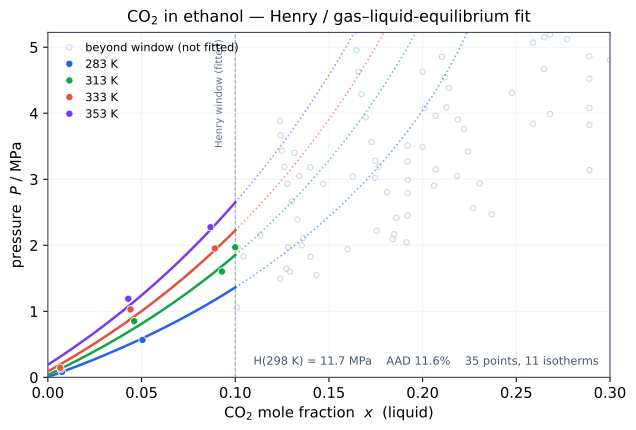
Gases dissolving in a liquid — CO2, methane, hydrogen, oxygen and the like — do not follow the same activity-coefficient description as an ordinary vapour–liquid pair, because the solute has no pure liquid at the temperature of interest. The platform now fits these gas–liquid equilibria (GLE) directly. Whenever a binary contains a component the engine recognises as a gas at the mixture temperature (from its boiling and critical point), the pair opens a dedicated gas-solubility page instead of the usual BIP page. The model is built around Henry's coefficient with a temperature dependence ln H = A + B/T (+ C ln T), fitted in a dilute “Henry window” in the gas mole fraction. On top of the ideal Henry line you can switch on a composition term for the rise of the apparent coefficient with loading, an NRTL γ/γ∞ correction, a Krichevsky–Kasarnovsky term for the partial molar volume of the dissolved gas at high pressure, and a Redlich–Kwong fugacity coefficient so the gas phase is treated as a real gas rather than ideal. Every set is regressed against your own and the platform's collected solubility data, with the same plot exclusions, robust down-weighting and per-set statistics as the other fits, and the figures show the apparent Henry coefficient f/x and the van't Hoff line H(1/T) beside the bubble-pressure isotherms. The figure below shows the fit for CO2 in ethanol against real measured data: the coloured points are the dilute isotherms used in the fit and the solid lines the model, hugging the data through the Henry window; the pale open circles are the wider high-loading data the window deliberately leaves out, where the dilute Henry description no longer holds and the model line is drawn only as a dotted extrapolation. A gas-solubility binary is a parameter source like any other. Its fitted Henry model can be linked from another project, and a pair in your project can take its gas-solubility model from a pure- or binary-component library project, write-protected and drawn against your own data — the same link-instead-of-repeat idea as for pure components and BIPs.
Link instead of repeat: library projects and the CHEMCAD databank as parameter sources
Until now every project had to regress or choose all of its parameters itself: the pure-component constants and correlations of each component, and the binary interaction parameters of each pair. When the same ethanol or the same ethanol/water pair appears in your next project, that work was repeated. It no longer has to be. On the project page each component and each binary mixture now has a Parameters pulldown with three kinds of source. "This project" is the familiar mode: everything is regressed and chosen inside the project. "Library" lists your other projects that already hold parameters for that component, or a fitted BIP set for that pair and the project's activity-coefficient model, plus the public example projects. Pick one and its parameters are merged into your project write-protected: they are used for every calculation and export, but they cannot be edited, cleared or refitted here. You can still open the property, BIP and correlation pages to see exactly how a linked set performs — the calculation is drawn against your own data as usual, and only the fit and select controls are switched off. The parameter box, the property pages and the BIP page show a lock badge with the name of the library project, so the origin of every number stays visible. Switch back to "This project" whenever you want to fit your own set. The third source is the CHEMCAD databank. Every pure-component record and every binary parameter set of the CHEMCAD banks installed on the host is now treated formally as an existing, frozen project that you can link to in the same way. For binary pairs the platform knows which sets exist before you choose: the option is offered only when the banks hold a set for that pair and the active model, otherwise it is greyed out with the reason. NRTL, UNIQUAC and Wilson sets are served this way, each in CHEMCAD's own parameter form; Wilson is new on the platform as a regression model of its own. UNIQUAC and Wilson sets are evaluated with the r/q values and liquid molar volumes of the CHEMCAD pure record they were regressed with, which stay masked like all other pure-component content. Chemstations' binary parameters are displayed like our own regression results, with the bank, the VLE or LLE subtype and the valid temperature range as their source. Pure-component parameters from the databank are licensed content: they are used internally for calculations and estimates, but the parameter box shows the word CHEMCAD instead of the values, and exports withhold them, because CHEMCAD reads them from its own databank anyway. Only the molar mass is shown. The correlation curves are still plotted against your data, labelled simply CHEMCAD, so you can judge how a databank set fits without ever seeing its coefficients. The idea behind this is a library of frozen parameter projects with full provenance. A multicomponent project becomes a set of pointers: this component from that library project, this pair from the databank, that pair fitted here against your own data. A source you link to is always a pure- or binary-component project — the small, single-purpose entries a library is built from — never another multicomponent project, which would only invite confusion about where a number really came from. Nothing is copied, so a library entry that is improved later can be adopted by a project on purpose rather than drifting silently. Extracting a single component or pair out of a multicomponent project into its own library entry, overlays for corrected databank values, and library links to further simulator banks, are next.
Platform Claude — the in-app assistant
The platform now has a built-in AI assistant that works inside your own projects. Ask it about a binary pair, your uploaded VLE/activity data, or our group-contribution engine (Rarey-Nannoolal Tb/Psat/critical constants, UNIFAC, COSMO-SAC), and it will look up real numbers rather than guess. It can also act directly in your project — add components and homologous series, pin estimates, set up kinetic ladders — with an automatic restore point taken before any change. Access is granted per account, so it is switched on for selected accounts rather than every visitor. Trusted accounts additionally get a model-development mode that fits models (NRTL/UNIQUAC BIPs, vapour-pressure refits, custom correlations) against a project's own data. Want it enabled for your account? Just ask.
Gigabit fiber link tested — more reliable now
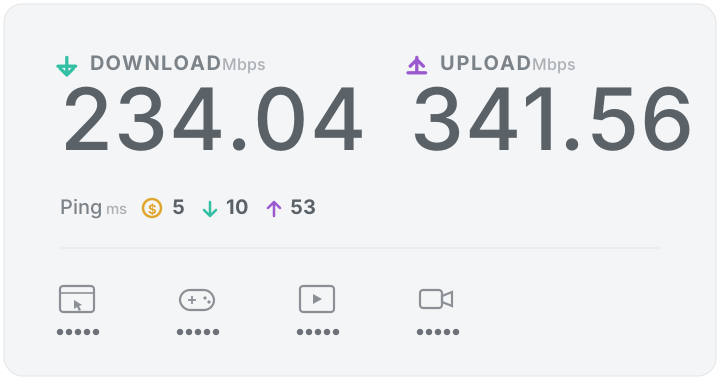
The new hard-wired link is up and measured: 234 Mbit/s down / 342 Mbit/s up with a 5 ms ping straight to the fiber modem. With the Wi-Fi bridge gone the platform should now be reliably online — steadier remote access, faster uploads and no more wireless dropouts. 🚀
Lab server now on gigabit fiber — no more Wi-Fi bridge
The lab server is finally hard-wired: a 120 ft gigabit cable now runs straight to the 300 Mbit/s fiber modem. The old Wi-Fi bridge is gone, so the platform, the CHEMCAD COM bridge and every lab service now sit on a solid wired link — lower latency and no more wireless dropouts. 🎉